





















Excellent cosmetic condition - looks like new and saves you money.


Save money
Enjoy significant savings without compromising on quality.

Reduce waste
Reduce electronic waste and lower your carbon footprint.

Extensively Tested
Every refurbished device is rigorously tested and repaired by certified technicians.

Warranty included
This device is protected with a warranty covering both parts and labour.
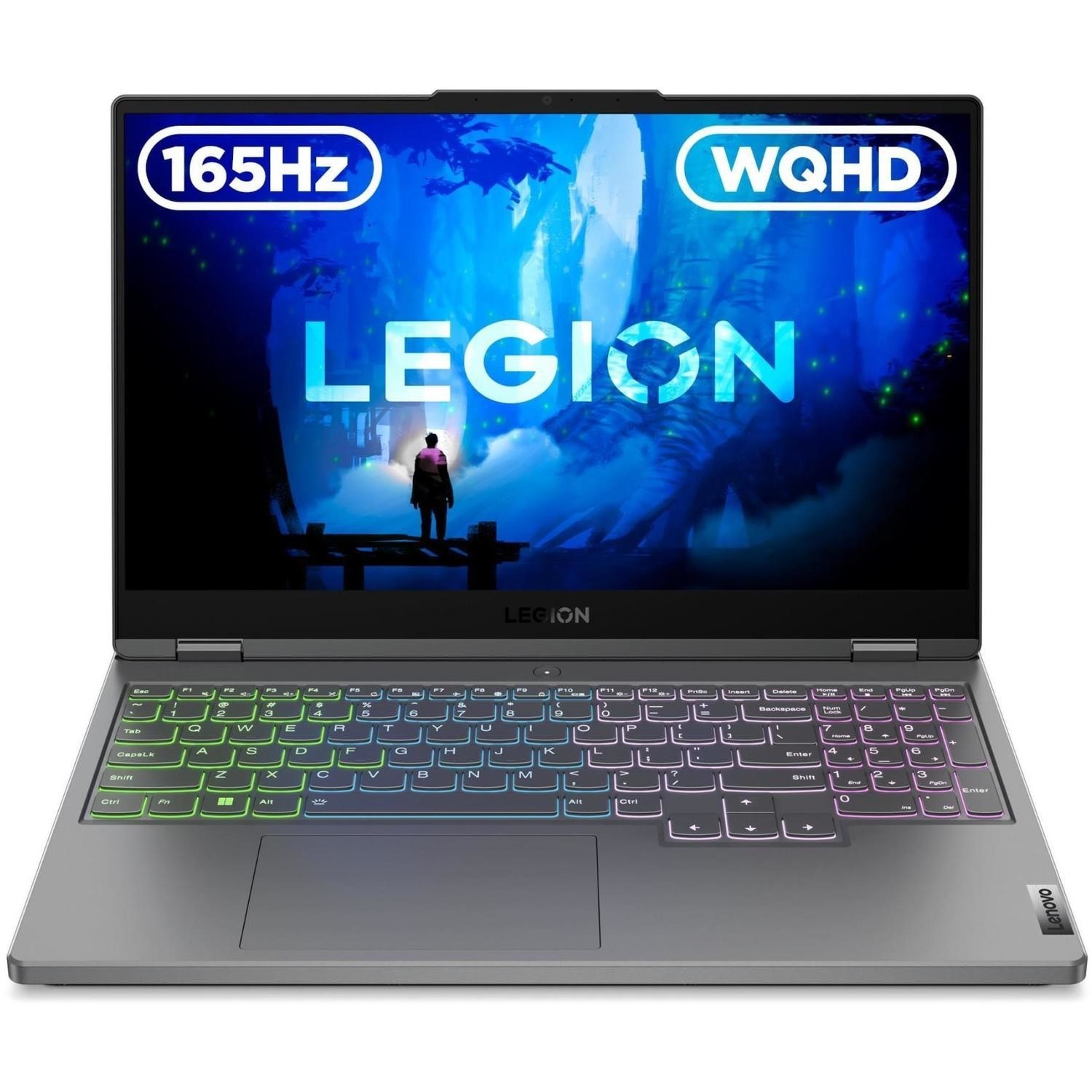
Decimate the competition with up to 12th Gen Intel Core processors, the latest NVIDIA GeForce RTX graphics, and the awesome Legion AI Engine, auto-detecting and auto-optimizing your in-game performance. Vanquish all your foes in stunning, precise WQHD+. And with a sleek Storm Gray or Glacier White chassis, the only other decision you’ll need to make is your trophy’s color.
Desktop-caliber gaming happens with Intel
With revolutionary performance and efficiency cores, 12th Gen Intel Core processors enable seamless streaming, editing, gaming, and recording, delivering responsiveness where you need it most. Intel Thread Director and up to Intel WiFi 6E support keep everything lag-free. At the same time, Intel Turbo Boost Technology boosts framerate in peak loads, so nothing slows you down.
Ultimate performance for gamers and creators
Experience ultimate performance with the latest NVIDIA GeForce RTX 30 Series Laptop GPUs for gamers and creators with maximum graphical power. Supercharged with Ray Tracing Cores, Tensor Cores, and streaming multiprocessors, as well as AI-Tuned DLSS, the GPU’s thin, light design delivers the most realistic ray-traced graphics, cutting-edge new features, and the power of AI.
Rise fast, rise first
Never miss a thing with the world's first 16" WQHD+ gaming display with up to 240hz refresh rates, 100% sRGB color accuracy, and Overdrive Technology. VESA DisplayHDR-certified, the display clocks incredible 3ms response times and comes with Dolby Vision support, TÜV Rheinland certification for low blue light, and NVIDIA G-Sync. Your rivals never stood a chance.
Maximize your frames, revolutionize your gaming
The Lenovo Legion AI Engine cultivates innovation, intelligence, and high performance. It dynamically channels any unused power from the CPU to the GPU or vice versa, based on where it’s needed most. It’s not magic, it’s just machine learning. As well as custom-tuned profiles, enjoy maximum frame rates on many of the most popular AAA titles and new releases in Auto-Detect mode.
Unleash your inner beast with DDR5
At last, DDR5 is here. Push your gaming past what's possible with 2x the bandwidth of DDR4 and tremendous increases in framerate reliability and system power efficiency. And, with up to 32GB of DDR5 memory, the Legion 5i Pro (16" Intel) lets you fully embrace the latest in advanced gaming technologies.
Defeat the heat, and all that’s in your way
With its expansive five-heat pipe layout, the Legion 5i Pro (16" Gen 7) also has a 140% more powerful fan system with 40% thinner fan blades than its predecessor. The Legion Coldfront 4.0 thermal system gives you three ways to control CPU and GPU temperatures and reduce overall fan noise. And with a dedicated CPU copper heat transfer block, it’s one quick, cool, and quiet beast.
Send your nemeses packing, in style
The Legion logo graces an aluminum and magnesium chassis on an aggressively engineered and I/O optimized machine. Competitive at all costs, dialed in to win, and designed to destroy. Now, you can enjoy the sweet smell of victory in Storm Gray or Glacier White. Just remember to design your winning trophy to match.
Strike with speed, play with precision
Thanks to innovative soft-landing switches, the Legion TrueStrike keyboard delivers deep 1.5mm strokes with equal force and 100% anti-ghosting. Strike with extreme precision at hair-trigger speed every time.
Truly immersive, game-changing audio
With its immersive 3D audio and vibrant, rich, and engaging features, Nahimic Audio drastically improves your gaming enjoyment from the get-go. It also enables you to communicate crystal-clearly with teammates for the perfect in-game experience. What’s more, it lets you mix and share audio-streaming journeys like a professional, with ease.
Embrace the Lenovo Vantage
Lenovo Vantage helps you optimize settings to elevate your gaming experience. You can adjust, customize, and maximize your laptop’s capabilities through our all-in-one suite of tools. With our real-time performance dashboard, overclocking controls, and AI-performance tuning with intelligent fan controls, nothing stands in the way of your success.
Enter the Legion Arena, enter the big time
Legion Arena lets you access all your games in one place, no matter where you purchased them from. See what other games are playing. Earn playing rewards and gaming achievements. Don’t waste time switching between different apps to see what to play. Just go ahead and play your games from their new home, the Legion Arena.



