








Get sales advice from our team 7 days a week
0871 244 0934Curved monitors feel more natural to use, especially during long hours. Its shape gently wraps around your view, so you move your head less and stay focused more easily. 27 to 34-inch sizes give you more space, and a 4K curved monitor adds sharper detail for editing, browsing or watching films.












SKU: eiq-49CVDQHD240VAPDKVM
Free Norton 360 Gaming
Get Free Norton 360 Gaming Internet Security worth £19.97 with this device.
Benefit from the following features:
• PC cloud backup to prevent data loss
• Real-time online threat protection
• Firewall protection to keep hackers out
• Password Manager securely stores passwords, card details & more
• Secure VPN with bank-grade encryption
• Safe Cam to protect your webcam from unauthorised access
• Dark Web monitoring alerts you if your data is found
• Parental Controls safely manage your children's online activities
• Compatible with iOS, Android, MacOS & Windows
Your product key card will be automatically added to your order.
Upgrade your stream aesthetic for free
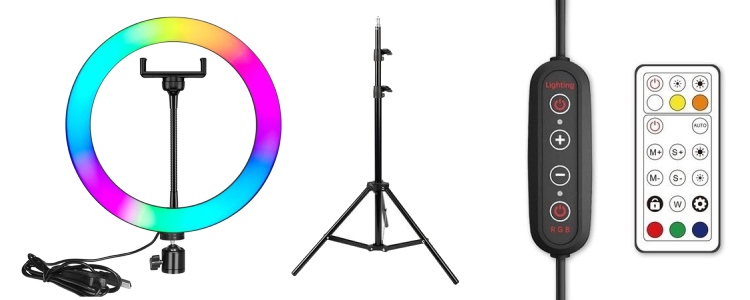
Your gameplay looks sharp, but does your live stream match that quality? When you buy selected electriQ gaming monitors, we include a 10" RGB LED ring light kit completely FREE. This allows you to upgrade your broadcast production value instantly.
The kit features a sturdy floor stand and a remote control, which ensures you can change colour profiles and brightness levels without pausing the match. The flexible phone holder fits all the latest smartphones from Apple, Samsung, and Huawei. Just connect it to a spare USB port on your rig to discover the ideal lighting setup for your community.
Claim your free kit by entering the code FREERGB at the checkout when you buy your new monitor. Offer valid while stocks last.







SKU: GAME-AW3225QF










A curved monitor helps you stay focused and see more without turning your head all the time. The curve gently brings the screen edges into your view, which feels more natural when working, watching or gaming. For people with smaller desks or shared spaces at home, this can make the difference between a cramped setup and one that’s more comfortable to use.
You’ll find popular sizes from 27-inch to large ones like 32-inch or 34-inch curved monitors. These all reduce glare, so they’re easier on your eyes for everyday tasks.
If you switch between work emails and video editing, or play open-world games, a curved screen monitor gives you more screen space in less physical room. It’s easier to stay productive with apps side by side. For gamers, a curved gaming monitor pulls you into the action and helps track movement quicker.
A 4K monitor is best if you want super sharp detail, ideal for both visuals and text. Some models, like a Samsung curved monitor, offer smoother motion and vivid colour, making them a smart upgrade for homes that use one screen for lots of things.
Most curved displays plug in fast and work with common cables, which is helpful if you're using it across consoles, laptops or desktops. If you’re looking for the best curved monitor for your setup, think about the space you have and the screen size that feels right.
Wondering if a curved screen makes a real difference? Our monitors buying guide explains when and why to go curved for gaming or everyday use.



