



















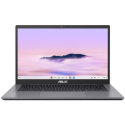

Excellent cosmetic condition - looks like new and saves you money.


Save money
Enjoy significant savings without compromising on quality.

Reduce waste
Reduce electronic waste and lower your carbon footprint.

Extensively Tested
Every refurbished device is rigorously tested and repaired by certified technicians.

Warranty included
This device is protected with a warranty covering both parts and labour.
Stunning Visuals with FHD Display
The Modern 14 F13MG-034UK features a 14-inch Full HD (1920x1080) display that delivers sharp, crisp visuals for all your daily tasks. With a 60Hz refresh rate and 45% NTSC color gamut, it ensures that images are vibrant and detailed, whether you're working on a project, streaming content, or browsing the web. The IPS-Level panel offers wide viewing angles, making it ideal for collaboration or entertainment from any position.
Impressive Power with Raptor Lake i3-1315U
Equipped with the latest Intel Raptor Lake i3-1315U processor, the Modern 14 F13MG-034UK provides the perfect balance of power and efficiency. Experience smooth performance and responsive multitasking for everyday tasks, whether you're working, studying, or enjoying media. With enhanced power-saving capabilities, this laptop ensures that you can keep working longer without sacrificing performance.
Smooth Multitasking with 8GB DDR4 RAM
The laptop comes with 8GB of DDR4 RAM, operating at 3200MHz, ensuring a smooth and lag-free experience when multitasking. Whether you're running multiple apps, browsing dozens of tabs, or handling larger files, this high-speed memory makes sure everything runs seamlessly, enhancing overall productivity and providing an optimized performance experience.
Fast Storage with 512GB NVMe PCIe SSD
The Modern 14 F13MG-034UK is equipped with a 512GB NVMe PCIe Gen4x4 SSD that offers lightning-fast read and write speeds, making boot-ups, file transfers, and app launches quick and responsive. The absence of DRAM ensures that this SSD is designed to handle intensive workloads while maintaining reliability and speed, ensuring you have enough storage for your data and applications without compromising on performance.
Windows 11 Home & Sleek Design
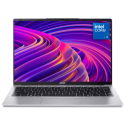
Pre-installed with Windows 11 Home, the Modern 14 F13MG-034UK gives you access to the latest features, security updates, and a streamlined interface. Whether you're using it for work or leisure, Windows 11 enhances your computing experience with a modern, user-friendly environment. The Urban Silver color adds a touch of elegance, making this laptop not just a functional tool but a stylish companion for both professional and personal use.



