







Appliances Direct
Laptops Direct
Drones Direct
Better Bathrooms
Furniture 123
Dehumidifiers
Outdoor Living
Aircon
Buying for Business?

Get sales advice from our team 7 days a week

0871 244 0934

Docking Station with 2 HDMI Ports

Docking stations with 2 HDMI ports let you create a cleaner multi-screen workspace. Connect two compatible displays alongside your keyboard, mouse, storage and wired network through one central hub. Selected models can also charge compatible laptops, helping to cut down on cables across the desk. Compare monitor support, USB ports, Ethernet and power output to find an ideal setup for home working, hot desks or busy offices.

Sort by

Refine your results

Items per page

1 - 4 of 4 products
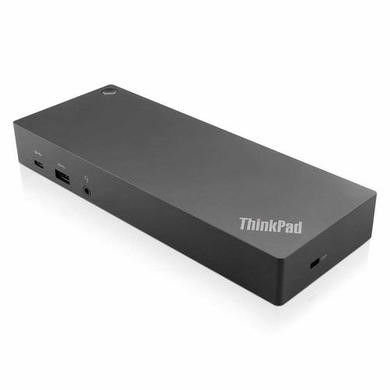
  • Product Type: Lenovo ThinkPad Hybrid USB-C with USB-A Dock, designed to expand laptop connectivity and provide a convenient single-cable workstation.
  • USB Connectivity: Includes 3 USB 3.2 Gen 2 ports supporting data transfer speeds of up to 10Gbps, 1 USB-C port and 2 USB 2.0 ports for connecting multiple peripherals.
  • Display Support: Features 2 DisplayPort outputs and 2 HDMI ports, supporting up to two external UHD 4K displays for enhanced multitasking and productivity.
  • Power Delivery: Supports up to 90W laptop charging for compatible ThinkPad devices and includes a 135W AC power adapter.
  • Network Connectivity: Includes a Gigabit Ethernet RJ-45 port for reliable wired network connections and stable internet access.
SAVE 30%
SAVE €85
€279.79
€194.97
PayPal Logo

Up to 12 Months 0% Credit

View product
  • 2 year warranty
  • HDMI Ports: 2
  • USB 3.0 Ports: 4
  • Internet Connection Type: Ethernet
€154.97
PayPal Logo

Up to 12 Months 0% Credit

View product
  • Max Monitors: 3
  • 2-year warranty
  • HDMI Ports: 2
  • USB 3.0 Ports: 3
  • Internet Connection Type: Gigabit Ethernet RJ45
€94.97
PayPal Logo

Up to 12 Months 0% Credit

View product
  • Max Monitors: 3
  • 2-year warranty
  • HDMI Ports: 2
  • USB 3.0 Ports: 4
  • Internet Connection Type: Gigabit Ethernet RJ45
€104.97
PayPal Logo

Up to 12 Months 0% Credit

View product

Sort by

Items per page

1 - 4 of 4 products

Set up two screens with a docking station with 2 HDMI ports

A docking station with 2 HDMI ports can connect two compatible monitors through one main laptop connection. This gives you more room for spreadsheets, emails, video calls and other daily tasks.

Windows can extend the desktop across several screens, so each monitor can show different content. Check the dock's display limits before buying, as two HDMI sockets don't always mean every laptop can run both screens at the same resolution and refresh rate.

Match a dual HDMI docking station to your laptop

A dual HDMI docking station needs to match the display features of your laptop. Start by checking whether the host connection is USB-C, Thunderbolt or USB-A and whether the dock uses native video or DisplayLink.

Some USB docks use DisplayLink to provide two extended screens, while other models depend on the laptop's own display support. This matters with MacBooks too, as support for extended displays can vary by Mac model and dock type.

Check resolution, charging and everyday connections

Don't stop at the HDMI sockets. Check the maximum resolution for both screens and whether the dock can run them at the refresh rate you need. Also, look for enough USB ports for keyboards, mice and storage, plus Ethernet if you use a wired network.

If you want one cable to charge your laptop too, compare the dock's power output with your computer's needs. Some docks don't include their own power supply, so it's worth checking what's in the box before you order.

Frequently Asked Questions

Yes, with compatible hardware. A suitable dock can send video to two external screens through one laptop connection. Your laptop still needs to support the display method used by the dock. If you're comparing different connection types and brands, browse our laptop docking stations.
They can if the dock supports extended displays. An extended setup gives each monitor its own desktop space rather than showing the same picture twice. Some docks use DisplayLink to provide this feature over USB-A or USB-C connections.
No. A basic HDMI splitter is generally used to send the same video signal to more than one screen. A suitable laptop dock can support separate external displays, as well as extra USB ports, Ethernet and other connections. For setups centred on this video connection, compare our HDMI docking stations.
Some docks can support two 4K displays, but you need to check the exact specification. Resolution and refresh rate depend on the dock, laptop and host connection. Some current docks support dual 4K at 60Hz on compatible systems, while others have lower limits.
First, check both HDMI cables and make sure each monitor is set to the correct input. Then check whether your laptop and dock support two independent external screens. The problem can come from display limits rather than a faulty socket. Users also report cases where different combinations of HDMI and DisplayPort behave differently, so testing each screen on its own can help narrow down the issue.

Recently viewed


Back to top