




Built for Productivity, Powered by Intel® Core™ i7
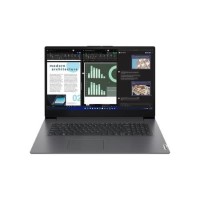
Stay ahead with the Lenovo V17 G4 IRU’s Intel® Core™ i7-13620H processor. Whether you’re multitasking, analyzing data, or working remotely, this laptop delivers swift performance that keeps up with your ambition.
Expansive 17.3" Full HD Display for Immersive Visuals
Experience vivid clarity and sharp detail on the 43.9 cm (17.3") Full HD screen. Perfect for content creation, streaming, or side-by-side document viewing, it turns everyday work into an engaging experience.
Seamless Speed with 16 GB DDR4 and 512 GB SSD
With 16 GB of DDR4-SDRAM and a lightning-fast 512 GB SSD, say goodbye to lag and hello to instant boot-ups, rapid file access, and efficient task management. Ideal for professionals on the move.
Sleek Clamshell Design in Elegant Grey
Combining form with function, the Lenovo V17 G4 IRU’s clamshell design is both stylish and durable. The grey finish adds a modern touch while staying low-profile for business and education settings.
Smart Graphics and Windows 11 Pro Experience
Enjoy smooth graphics performance with Intel Iris Xe Graphics, and navigate with ease using Windows 11 Pro. Enhanced security and productivity features make this laptop a powerful workstation right out of the box.