











Appliances Direct
Laptops Direct
Drones Direct
Better Bathrooms
Furniture 123
Dehumidifiers
Outdoor Living
Aircon
Buying for Business?

Get sales advice from our team 7 days a week

0871 244 0934

Refurbished Dell XPS 8950 Core i7-12700KF 16GB 2TB & 512GB RTX 3060Ti Windows 11 Desktop

SKU: A2/Y5K7K Quickfind Code: 1782637
SAVE 24%

This product is no longer available.

Still need help?

For help finding something similar, just give us a call on 0871 244 0934*

* Calls cost 13p per min plus your network access charge

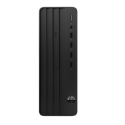
This Dell XPS is powered by a 12th gen i7 processor, RTX graphics and DDR5 RAM, so it's ready for anything from power-hungry programs to AAA gaming.

What we love

  • The 12th gen Intel Core i7 processor has 12 cores to power through any task you throw at it
  • With the GeForce RTX 3060 Ti graphics card you can play your favourite games, edit photos or videos and run demanding programs
  • DDR5 RAM brings the new generation of performance to your PC - with 16 GB you can multitask with ease

Good to know

  • 2 TB HDD and 512 GB SSD storage means you'll have plenty of room for your movies, documents and games
  • Killer WiFi and Ethernet improve internet speeds and reduce latency for a snappy and smooth online experience
  • Air cooling with improved airflow keeps your components cool, which improves their performance and prolongs their life
  • SuperSpeed USB lets you quickly transfer games and media to external hard drives
  • There's a wide selection of ports on the back and front of the PC for easy connectivity


Some devices may come with Windows 11 pre installed, but some may need manually updating to the latest version of Windows from Windows 10, 10S or 11S. It's easy and free to do in just 3 easy steps. Find out how by clicking here »

How To Easily Update Your Windows Laptop

Some devices may come with Windows 11 pre installed, but some may need manually updating to the latest version of Windows from Windows 10, 10S or 11S. It's easy and free to do in just 3 easy steps.

Windows 11 the most productive and secure version of windows yet with easy Navigation, easy organisation and faster performance. Windows 11 has all the power and security of past Windows verisions but with a redesigned and refrshed look. With new tools, sounds and apps that all come together to bring a new refreshing Windows experience.

1. Settings > On your device Select the start button, then click on settings.

2. Updates & Security > Click on Updates & Security.

3. Windows Update > Select check for updates. If updates are available, click instal to get the latest version of Windows.


You may also like

Recently viewed


Back to top
