








Excellent cosmetic condition - looks like new and saves you money.


Save money
Enjoy significant savings without compromising on quality.

Reduce waste
Reduce electronic waste and lower your carbon footprint.

Extensively Tested
Every refurbished device is rigorously tested and repaired by certified technicians.

Warranty included
This device is protected with a warranty covering both parts and labour.
Powerful Processor and High Performance
The Medion Engineer X30 is equipped with an Intel Core i7-14700F processor, delivering robust performance for both gaming and intensive multitasking. This high-end processor ensures that the system can handle the latest games and applications with ease, providing a seamless and responsive computing experience. With its impressive speed and efficiency, users can enjoy smooth gameplay and quick load times.
Ample Memory and Storage
This gaming desktop comes with 32GB of RAM, offering ample memory for running multiple applications simultaneously without any lag. Additionally, it features a 1TB solid-state drive (SSD) that provides substantial storage space for games, software, and media files. The SSD not only increases storage capacity but also enhances the overall system performance by enabling faster data access and shorter boot times.
Advanced Graphics Capabilities
The Medion Engineer X30 is powered by an NVIDIA GeForce RTX 4070 graphics card, which is designed to deliver stunning visuals and high frame rates. This advanced GPU supports real-time ray tracing and AI-enhanced graphics, making it perfect for gamers who demand the best visual experience. Whether playing the latest AAA titles or engaging in VR gaming, this graphics card ensures immersive and lifelike visuals.
Modern Operating System
Running on Windows 11 Home, the Medion Engineer X30 offers a modern and user-friendly operating system that enhances productivity and entertainment. Windows 11 brings a refreshed interface, improved performance, and new features such as Snap Layouts and virtual desktops. The operating system is optimized for gaming, providing better game load times, DirectStorage support, and an overall smoother gaming experience.
Sleek and Functional Design
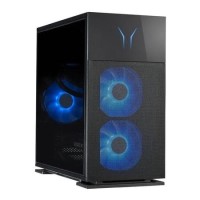
The Medion Engineer X30 boasts a sleek and contemporary design that fits well in any gaming setup. Its well-ventilated case ensures efficient cooling, which is crucial for maintaining optimal performance during extended gaming sessions. The desktop also includes multiple connectivity options, allowing users to easily connect peripherals and accessories. This combination of aesthetic appeal and practical functionality makes the Medion Engineer X30 a great addition to any gamer's arsenal.