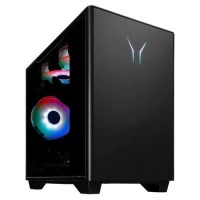




Powerful Performance with Intel Core i7-14700F
The MEDION Erazer Bandit P20 is equipped with the Intel Core i7-14700F processor, offering a base clock speed of 2.1 GHz and a boost clock speed of up to 5.4 GHz. This 20-core, 28-thread processor ensures smooth and efficient performance for gaming, multitasking, and other demanding applications.
Seamless Multitasking with 16GB RAM
This gaming PC comes with 16GB of RAM, providing ample memory for running multiple applications and games simultaneously. The high-speed memory ensures that you can switch between programs, load large files, and play memory-intensive games without any slowdowns.
Superior Graphics with NVIDIA GeForce RTX 4060
The MEDION Erazer Bandit P20 features the NVIDIA GeForce RTX 4060 graphics card with 8GB of GDDR6 memory. This GPU supports ray tracing and DLSS technologies, providing highly detailed graphics, faster frame rates, and realistic lighting effects in supported games.
Ample Storage with 1TB SSD
Storage is no issue with the 1TB NVMe SSD, ensuring fast read and write speeds, drastically reducing load times, and providing smooth performance when accessing large files or launching games. The generous storage space also gives you enough room to store a large library of games, media, and software.
Optimized Experience with Windows 11 Home
The MEDION Erazer Bandit P20 runs on Windows 11 Home, offering a sleek and user-friendly interface optimized for both gaming and productivity. With features like DirectStorage and AutoHDR, Windows 11 enhances your gaming experience by providing faster load times and better visual quality.