

















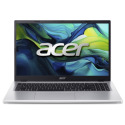


Experience smooth performance, versatile productivity, and modern design with the Acer Aspire Go 14. Built to support your everyday computing needs, this laptop combines the power of the AMD Ryzen™ 3 7320U processor with 8GB of memory and a spacious 256GB SSD. Whether you're working, learning, or streaming, the 14-inch Full HD display and Windows 11 Home offer a seamless, user-friendly experience in a lightweight and stylish package.
Powerful AMD Ryzen™ 3 Processor
The AMD Ryzen™ 3 7320U quad-core processor ensures snappy and responsive performance for multitasking, productivity apps, and everyday computing. Built on AMD’s Zen 2 architecture, it delivers exceptional energy efficiency while providing the power you need.
Ample Memory and Storage
Equipped with 8GB LPDDR5 RAM, the Aspire Go 14 offers smooth multitasking and quick application launches, so you can stay productive without lag. The 256GB NVMe SSD provides ample storage for your files, documents, and media, with fast read/write speeds for quicker boot times and file transfers.
Stunning 14-Inch Full HD Display
The 14-inch Full HD (1920 x 1080) display offers crisp visuals and vibrant colors, making it perfect for work, study, and entertainment. The slim bezels provide an immersive viewing experience, while the compact design ensures portability without sacrificing screen space.
Modern Design and Lightweight Portability
With its sleek, modern chassis and lightweight design, the Aspire Go 14 is easy to carry, making it ideal for students, professionals, and on-the-go users. The stylish finish complements its practicality, offering a professional look for any setting.
Windows 11 Home: Intuitive and Secure
Pre-installed with Windows 11 Home, this laptop provides an intuitive user interface, enhanced productivity tools, and robust security features. Enjoy features like Snap Layouts, Microsoft Teams integration, and improved multitasking capabilities.
Reliable Connectivity and Versatile Ports
Stay connected with Wi-Fi 6 for faster, more stable internet connections, ensuring seamless video calls, downloads, and streaming. Equipped with a range of ports, including USB-C, USB-A, HDMI, and a 3.5mm audio jack, for connecting peripherals and external displays.
Long-Lasting Battery Life
The Aspire Go 14 is designed to keep up with your busy day, offering up to 8 hours of battery life on a single charge. Whether you're working from home or attending lectures, you can rely on it to power through your tasks.
Eco-Friendly and Durable Design
Acer’s commitment to sustainability ensures the Aspire Go 14 is built with eco-conscious materials, making it a greener choice without compromising on durability.



