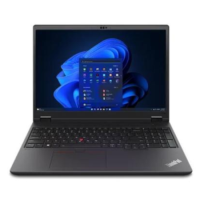





Excellent cosmetic condition - looks like new and saves you money.


Save money
Enjoy significant savings without compromising on quality.

Reduce waste
Reduce electronic waste and lower your carbon footprint.

Extensively Tested
Every refurbished device is rigorously tested and repaired by certified technicians.

Warranty included
This device is protected with a warranty covering both parts and labour.
Designed for innovators and professionals, the 16″ ThinkPad P16v Gen 2 mobile workstation packs the power of Intel® Core Ultra™ processors with Intel vPro® and AI-ready integrated Neuro Processing Unit (NPU) for anything you want to do. Even better — it boasts OS alternatives, embracing performance, versatility, mobility, and affordability.
Execute Workloads Like a Boss
Now, multitask and execute complex workflows in AI effortlessly with up to NVIDIA® RTX™ 3000 Ada laptop GPUs. Produce high-quality images and animations, and create high-end 3D visualizations, thanks to vast memory and storage options. Also, this mobile workstation runs software optimally as it is Independent Software Vendor (ISV)* certified.
Embark on a Stunning Visual Journey
With entry-level to premium display options, narrow bezels for an unobstructed gaze, and a range of brightness and color gamut options, this 16″ ThinkPad mobile workstation is a visual powerhouse. Choose a 5MP + infrared webcam to enjoy stunning clarity during video calls with HDR400 and Dolby Vision® and elevate online meetings.
User Experience Functionality Reimagined
With a spill-resistant, full-sized backlit keyboard containing a numeric pad, LED on some keys, and a large TrackPad (115mm / 4.53″), the 16″ ThinkPad P16v Gen 2 workstation is engineered for accessibility, functionality, and usability. Add a Thunderbolt™ 4 Docking station to expand your useable visual real estate with one or two external displays.
Your Connectivity Playground
Access designs and move large files at lightning-fast data transfer speed (up to 40Gbps) of Thunderbolt™ 4. Delve into seamless online interactions on WiFi, Ethernet, or 4G. Instantly transfer photos from your phone to the device with Magic Move, and sync data to your workstation with just a tap or swipe via Near Field Communication (NFC).
Fearless in Security, Durability, & Form
Protected by ThinkShield, the ThinkPad P16v Gen 2 mobile workstation includes a fingerprint reader for easy log in and self-healing BIOS to restore earlier system settings. It is MIL-SPEC tested for ultimate durability, energy efficient with several certifications including EPEAT® Gold, and comprises recycled components and plastic-free packaging.
Smart Performance
Lenovo Smart Performance will improve your computer experience! Inject more power into your computer to achieve smooth operation and blazingly quick starts. Savor a faster, more reliable internet experience with enhanced connectivity. Protect your IT investment by using improved security to ward off adware, malware, and other threats. Unleash the potential for a thrilling virtual journey!