


Excellent cosmetic condition - looks like new and saves you money.


Save money
Enjoy significant savings without compromising on quality.

Reduce waste
Reduce electronic waste and lower your carbon footprint.

Extensively tested
Every refurbished device is rigorously tested and repaired by certified technicians.
BSI Kitemark Certified
This device meets the BSI Kitemark™ certification standards, guaranteeing its quality and safety.

Warranty included
This device is protected with a warranty covering both parts and labour.
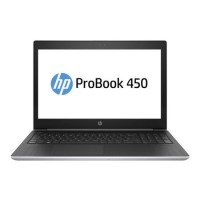
Full-featured, thin, and light, the HP ProBook 450 lets professionals stay productive in the office and on the go.
Stylish design, linear precision, and subtle curvature plus Quad Core performance make this ProBook essential for today’s workforce.
Powerful processing
Get through your deadline-driven, multitasking day with 8th Gen Intel Core i5 Quad Core processor.
The HP Probook 450 G5 comes with a powerful Core i5 processor and 16GB of RAM plus a 256GB SSD, providing a high level of performance to help you power through any task.
Stylish and durable ultraslim design
The HP ProBook 450 delivers stylish design to every business. An ultraslim chassis in a refined new natural silver finish includes a keyboard deck made of durable premium stamped aluminum.
Designed for docking
Quickly transition to desktop productivity with a single cable that supports docking via USB-C which allows you to connect multiple external displays, a power source, and a gigabit network connection.
Immersive experience
Experience vivid audio engagement and an easy conferencing experience with the Skype for Business Certified HP ProBook 450 with HP Audio Boost, HP Noise Cancellation.
Let nothing stand in your way
Experience the new features of Windows 11 Pro on the thin, light HP ProBook 450.
Protect your data with multi-factor authentication
Fortify your security by using multiple factors of authentication including fingerprints and facial recognition.
Stay connected with self-healing wireless driver technology and support for the latest global 4G LTE wireless broadband technology.
Tested to go the distance
Stand up to the workload with a ProBook that is designed to pass MIL-STD 810G testing.
Cut out the chatter
Help suppress ambient noise including keyboard clicks with HP Noise Cancellation.
Give your speakers a boost
Help make good speakers sound great with the HP Audio Boost.
What's in the Box?
- Laptop
- Power adaptor
When setting up your new unit you will need to activate your Microsoft License Key. Follow the simple step by step guide to find out how to do so, it is really quick and easy to do!
How to activate your Microsoft License Key »