




Very good condition - may display light cosmetic marks.


Save money
Enjoy significant savings without compromising on quality.

Reduce waste
Reduce electronic waste and lower your carbon footprint.

Extensively tested
Every refurbished device is rigorously tested and repaired by certified technicians.
BSI Kitemark Certified
This device meets the BSI Kitemark™ certification standards, guaranteeing its quality and safety.

Warranty included
This device is protected with a warranty covering both parts and labour.
Brilliant new design
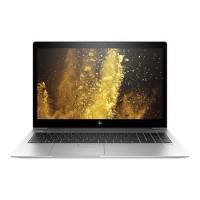
This ultra-slim, precision-crafted aluminium laptop with a narrow border display goes anywhere, and looks great doing it.
Built on a secure foundation
Protect your PC against the evolving malware threats of the future, with self-healing, hardware-enforced, and manageable security solutions from HP. From the BIOS to the browser HP Sure Start Gen41 and HP Sure Click2 help secure your PC.
Crystal-clear collaboration
Calls sound crisp and clear with advanced collaboration features like HP Noise Cancellation. Loud top-firing speakers produce rich sound. The world-facing third microphone and collaboration keys help make PC calls productive.
A modern docking solution
Quickly transition to desktop productivity with a single USB-C-cable. Traditional side docking is also supported to work with your existing solution.
Let nothing stand in your way
Power through your day with Windows 11 Pro and the powerful security, collaboration and connectivity features from HP.
Preserve your privacy
Never wonder if someone is watching you with the added peace-of-mind that comes from the integrated HP Privacy Camera, with a physical shutter to protect from malicious surveillance. Firmware level protection
What's In The Box?
- Laptop
- Power Adaptor
When setting up your new unit you will need to activate your Microsoft License Key. Follow the simple step by step guide to find out how to do so, it is really quick and easy to do!
How to activate your Microsoft License Key »