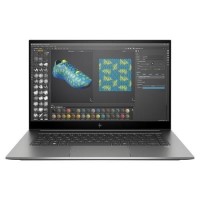









Very good condition - may display light cosmetic marks.


Save money
Enjoy significant savings without compromising on quality.

Reduce waste
Reduce electronic waste and lower your carbon footprint.

Extensively tested
Every refurbished device is rigorously tested and repaired by certified technicians.
BSI Kitemark Certified
This device meets the BSI Kitemark™ certification standards, guaranteeing its quality and safety.

Warranty included
This device is protected with a warranty covering both parts and labour.
Blazing Performance with Intel® Core™ i9 10th Gen Processor
At the heart of the HP ZBook Studio G7 lies the 10th generation Intel® Core™ i9 processor, engineered to deliver lightning-fast performance for high-demand tasks. Whether you're compiling large codebases, rendering 3D models, or editing high-resolution video, this powerful CPU ensures smooth, efficient processing to keep your workflow seamless and uninterrupted.
Exceptional Multitasking with 32GB DDR4 RAM
With 32GB of high-speed DDR4 memory, the ZBook Studio G7 handles multitasking with ease. Run multiple professional applications simultaneously—such as CAD software, Adobe Creative Suite, or virtual machines—without experiencing lag or slowdown. This capacity is ideal for creators, engineers, and developers who demand robust system memory for their everyday tasks.
High-Speed Storage with 512GB SSD
The 512GB Solid State Drive offers rapid data access and boot-up times, ensuring minimal delays when opening large files or launching software. With SSD storage, you can expect better durability, quieter operation, and significantly faster performance compared to traditional hard drives, all while keeping your essential files and projects securely at your fingertips.
Pro-Grade Graphics with NVIDIA® Quadro® T2000
Designed for professional creatives and technical users, the NVIDIA® Quadro® T2000 GPU provides reliable, high-performance graphics rendering for everything from 3D visualization to complex simulations. Certified for a wide range of industry applications, this workstation-grade graphics card empowers users to tackle intensive visual workloads with precision and stability.
Optimized for Professionals with Windows 11 Pro
Pre-installed with Windows 11 Pro, the ZBook Studio G7 is optimized for business and productivity. Enjoy enterprise-grade security, enhanced multitasking features, and compatibility with a wide range of professional software. The modern interface and productivity enhancements of Windows 11 Pro help streamline your workflow and keep you organized and efficient.
What's In The Box?
- Laptop
- Power Adaptor
When setting up your new unit you will need to activate your Microsoft License Key. Follow the simple step by step guide to find out how to do so, it is really quick and easy to do!
How to activate your Microsoft License Key »